SCDev Montage:
What if your users could build beautiful image compositions without ever touching the WordPress dashboard?
No page builders. No complicated tools. Just a clean, powerful front-end workspace.
That’s exactly what SCDev Montage delivers.
🚀 A New Way to Work With Images in WordPress
Most gallery plugins are passive — you upload images and they display them.
SCDev Montage flips that idea completely.
Instead of just showing images, it gives users a full creative workspace where they can:
-
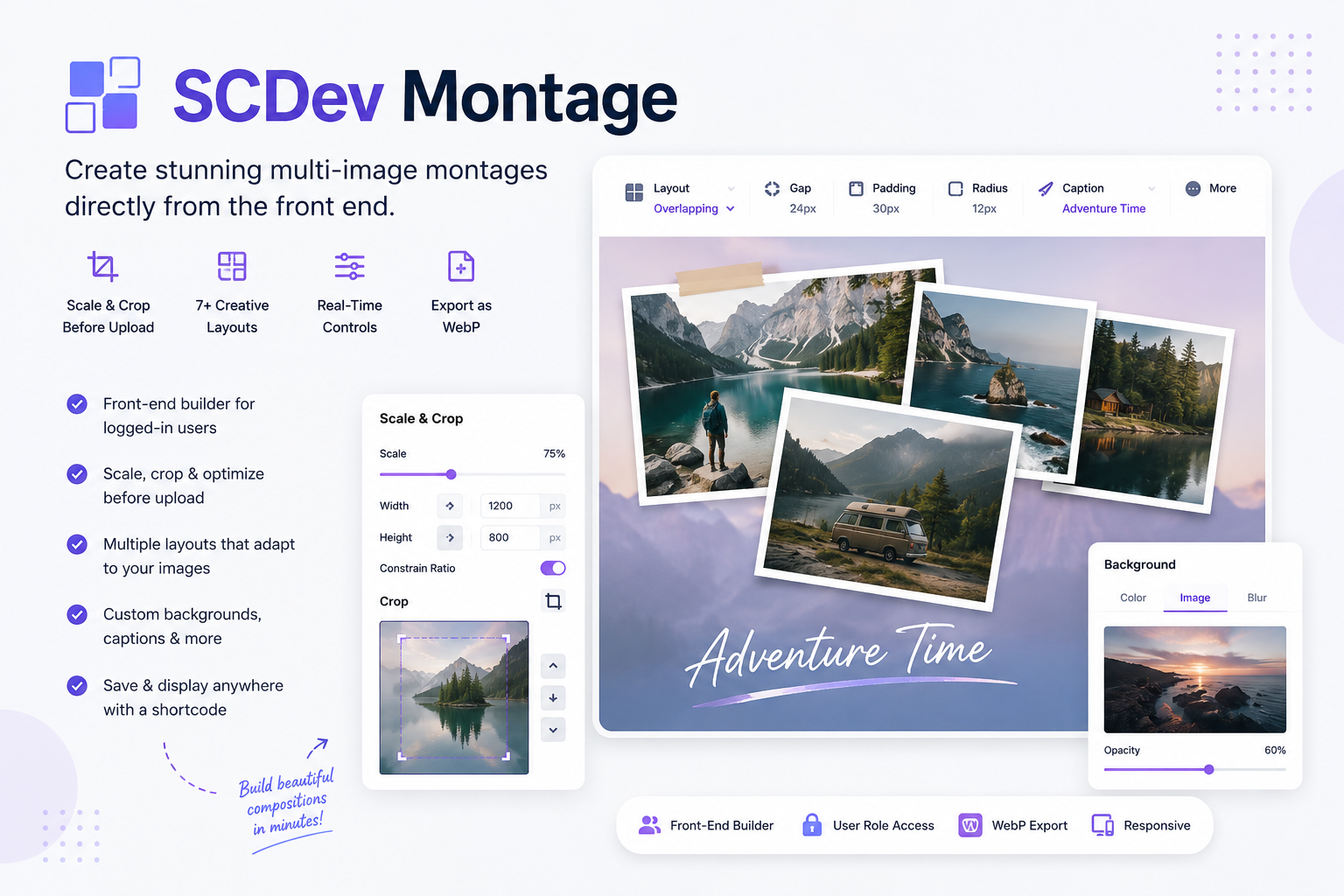
Upload, scale, and crop images before they hit the media library
-
Arrange them into professional layouts
-
Customize spacing, backgrounds, captions, and more
-
Export a polished final image ready for use anywhere
All from the front end.
✂️ Edit Before You Upload (Game-Changer)
One of the standout features is the built-in image editor that runs before upload.
That means:
-
No oversized images clogging your media library
-
No external editing tools needed
-
No post-processing headaches
Users can:
-
Scale images from 10% to 100% (no quality loss from upscaling)
-
Crop precisely using drag handles or exact values
-
Combine scaling and cropping in a single step
-
Preview everything live before saving
The result? Clean, optimized media — every time.
🧱 Smart, Adaptive Layouts
SCDev Montage includes a variety of layouts that automatically adjust based on image count:
-
Grid — simple and flexible
-
Overlapping Photos — layered, polaroid-style designs
-
Circle Collage — artistic circular arrangements
-
Rectangle Collage — structured but dynamic layouts
-
Polaroid — classic stacked photo feel
-
Feature — hero image with supporting visuals
-
Magazine — editorial-style compositions
Each layout isn’t static — it intelligently adapts to create balanced, professional results.
🎛️ Real-Time Creative Control
Every adjustment updates instantly in the preview.
Users can fine-tune:
-
Spacing and overlap between images
-
Padding around the montage
-
Corner radius for styling
-
Caption text, color, and position
-
Background color, opacity, blur, or image
-
Canvas ratio (perfect for social media formats)
-
Image fit (cover or contain)
This gives users full creative control without complexity.
🎯 Built for Real-World Use Cases
SCDev Montage isn’t just a visual tool — it solves real problems:
-
Portfolios — designers create their own layouts without admin access
-
Product showcases — combine hero and detail shots seamlessly
-
Event promotions — turn multiple photos into one polished graphic
-
Social media content — export perfectly sized images (1:1, 4:5, etc.)
-
Client proofing — let clients upload and arrange their own images
-
Editorial content — magazine-style layouts for storytelling
-
Team pages — clean, modern headshot arrangements
📦 Export Ready, Optimized Output
When a montage is saved:
-
A final WebP image is generated automatically
-
Output matches exact canvas dimensions
-
File size is optimized without sacrificing quality
Then simply display it anywhere using:
🔐 Controlled Access, Front-End Freedom
You stay in control while giving users creative freedom:
-
Restrict access by user roles
-
Allow uploads only for logged-in users
-
Limit builder access per shortcode placement
Admins always have full access, while everything else is configurable.
⚙️ Simple Setup
Getting started is easy:
-
Install and activate the plugin
-
Use the builder shortcode on any page
-
Configure access settings
-
Let users start creating
No complex setup. No learning curve.
💡 Why SCDev Montage Stands Out
This isn’t just another gallery plugin.
It’s a creative tool built for modern workflows:
-
Front-end editing
-
Pre-upload optimization
-
Smart layout logic
-
Instant export
It bridges the gap between image editing, layout design, and content publishing — all inside WordPress.
✨ Final Thoughts
SCDev Montage changes how users interact with images on your site.
Instead of just uploading and displaying, they can create.
And that opens the door to better content, cleaner media libraries, and a much more powerful user experience.
Start building smarter image layouts today.